42 pre-built harnesses · 24 categories · pip install ready
Make Any Software Agent-Native
Turn any GUI desktop app into an AI-callable CLI — in one command. No UI automation. No screenshots. No fragility.
- ▸Any GUI app becomes agent-callable — GIMP, OBS, LibreOffice, Blender, browser
- ▸Pure structured CLI with --json output — structured data, no parsing hacks
- ▸42 pre-built harnesses ready to install. Build your own for anything not in the registry
- ▸Every harness ships with SKILL.md so agents self-discover it automatically
How It Works
The GUI → CLI → Agent Pipeline
Three steps. Every GUI app becomes a pip-installable CLI your agents can call directly.
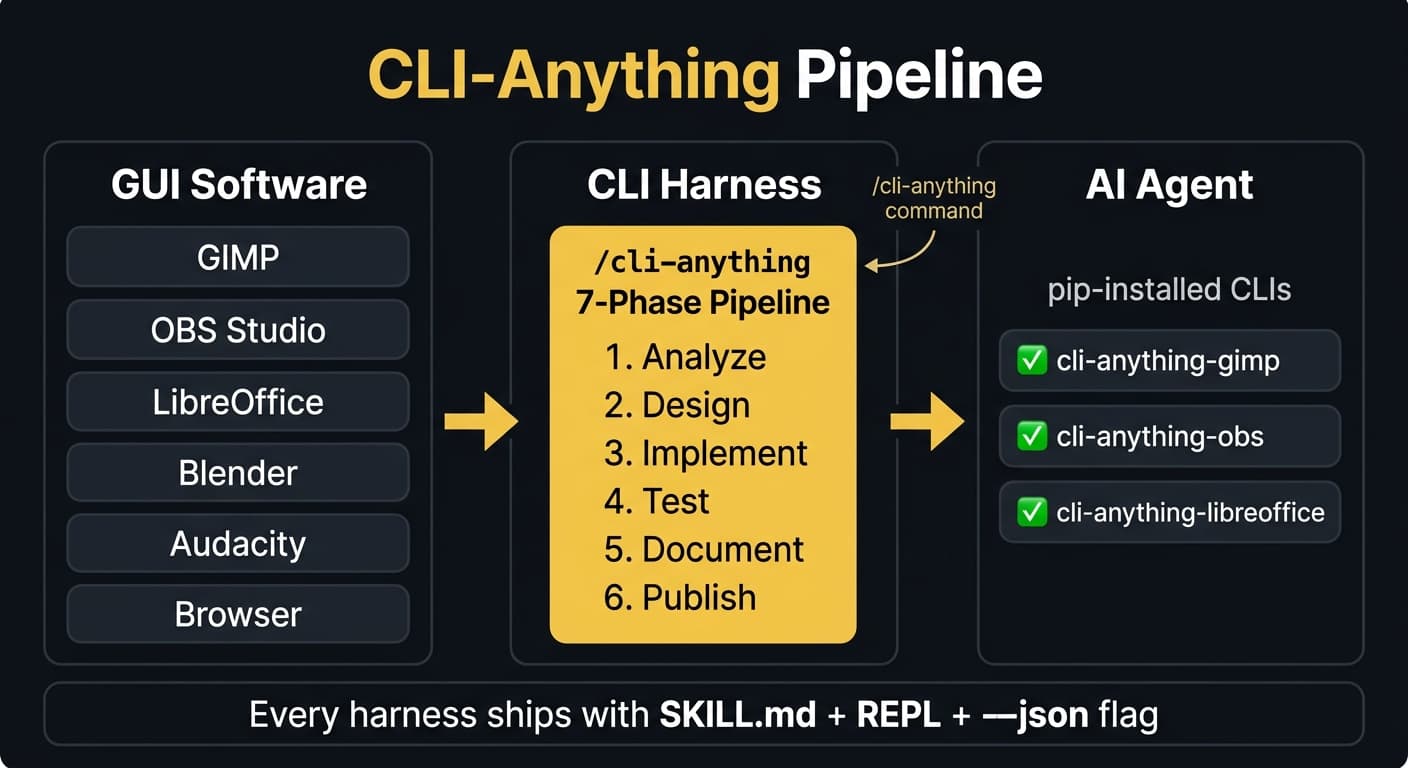
7-Phase Methodology
1
Analyze
Identifies backend engine, maps GUI actions to API calls, catalogs file formats
2
Design
Architects command groups, state model, and output format (JSON + human-readable)
3
Implement
Builds Click CLI: commands, REPL, backend integration, session management
4
Plan Tests
Creates TEST.md with unit + E2E test inventory before writing any code
5
Write Tests
Implements full test suite against real software — not mocks
6
Document
Updates TEST.md with results, generates usage docs
7
Publish
Creates setup.py, installs to PATH as cli-anything-<name>
Every harness ships with
SKILL.md (agent-discoverable)Stateful REPL--json flag on every commandUndo/redo supportpip install to PATH
SOP
Get Running in 5 Minutes
Three install methods. Pick whichever fits your workflow.
Method A — Claude Code Plugin (Recommended)
# 1. Add the marketplace
/plugin marketplace add HKUDS/CLI-Anything

# 2. Install the plugin
/plugin install cli-anything

# 3. Generate a harness for any app
/cli-anything:cli-anything ./gimp

# 4. Refine for your use case (run multiple times — non-destructive)
/cli-anything:refine ./gimp "batch image processing and export"

# 5. Use it
cli-anything-gimp --help
Method B — CLI-Hub Package Manager
# Install the hub
pip install cli-anything-hub

# Browse available harnesses
cli-hub list

# Install a specific harness
cli-hub install gimp

# Use it
cli-anything-gimp --help
Method C — Direct pip Install
pip install git+https://github.com/HKUDS/CLI-Anything.git#subdirectory=gimp/agent-harness
cli-anything-gimp --help
Pro tip:Add
--json to any command for agent-parseable output: cli-anything-gimp --json project info -p myproject.jsonAgency Workflows
How the Team Uses It
Real use cases mapped to real agents and real harnesses.
GMB Image Batch Processing
Agents: PicassoHarnesses: gimp, krita, inkscape
- ✓Resize 50 images to GMB spec without touching the GUI
- ✓Apply watermarks and brand overlays in batch
- ✓Export to JPEG/PNG/WebP at target file sizes
- ✓Layer operations, filters, and color adjustments — all scriptable
cli-anything-gimp --json layer add-from-file -f brand-logo.png -p project.json
cli-anything-gimp export -f jpg --quality 85 -o output/ -p project.json
Video Production Pipeline
Agents: SpielbergHarnesses: obs-studio, kdenlive, shotcut, videocaptioner, audacity
- ✓Set up OBS scenes and start/stop recording via CLI
- ✓Cut, trim, and render video clips with Kdenlive or Shotcut
- ✓Auto-caption with VideoCaptioner — transcribe, translate, burn styled subtitles
- ✓Normalize audio levels before export
cli-anything-obs_studio scene switch -n "Interview Layout" -p session.json
cli-anything-videocaptioner transcribe -i episode.mp4 --translate en --burn-subs
SEO Browser Automation
Agents: Einstein, TommyHarnesses: browser, clibrowser, exa
- ✓Crawl SERPs and extract structured data with zero setup
- ✓Run accessibility and Core Web Vitals audits programmatically
- ✓Pull competitor page structures for entity analysis
- ✓AI-powered search with source extraction via Exa
cli-anything-clibrowser --json fetch --url "https://example.com" --extract-text
cli-anything-exa search --query "roofing contractor near Dallas" --num-results 10
Podcast & Audio Processing
Agents: ShakespeareHarnesses: audacity, libreoffice
- ✓Normalize episode audio levels, cut silence, export to MP3
- ✓Apply noise reduction and EQ profiles in batch
- ✓Generate show notes as DOCX/PDF from LibreOffice templates
cli-anything-audacity --json effect apply -n "Normalize" -p episode.json
cli-anything-libreoffice convert -i shownotes-template.odt -f pdf -o episodes/
Research & OSINT
Agents: RavenHarnesses: exa, intelwatch, clibrowser
- ✓Run B2B competitive intelligence on target domains via IntelWatch
- ✓Pull AI-powered search results with full source extraction via Exa
- ✓Scrape and structure web content without leaving the agent session
cli-anything-intelwatch analyze --domain competitor.com --report full
cli-anything-exa --json search --query "site:competitor.com" --type company
Custom Harnesses
Build Your Own Harness
When the tool you need isn't in the registry — or you have an internal app with no API.
When to build one
- ▸The tool you need isn't in the registry
- ▸You have an internal tool with no public API
- ▸You want to unify scattered API endpoints into one stateful CLI
Steps
# 1. Get the source
git clone https://github.com/org/your-tool.git

# 2. Run the 7-phase pipeline
/cli-anything:cli-anything ./your-tool

# 3. Refine (run multiple times — each pass is incremental)
/cli-anything:refine ./your-tool "add batch processing commands"
/cli-anything:refine ./your-tool "expand export format support"

# 4. Validate
/cli-anything:validate ./your-tool

# 5. Use it — installed to PATH
cli-anything-your-tool --help
✓ Full Click CLI
All commands the tool supports
✓ Test Suite
Unit + E2E with real software
✓ SKILL.md
Agents self-discover it
✓ Stateful REPL
Interactive mode + tab-completion
✓ setup.py
pip install anywhere
No source code? Use an open-source alternative — GIMP instead of Photoshop, Kdenlive instead of Premiere, LibreOffice instead of Office, Inkscape instead of Illustrator.
Team Reference
Agent Harness Map
Who uses what — and why.
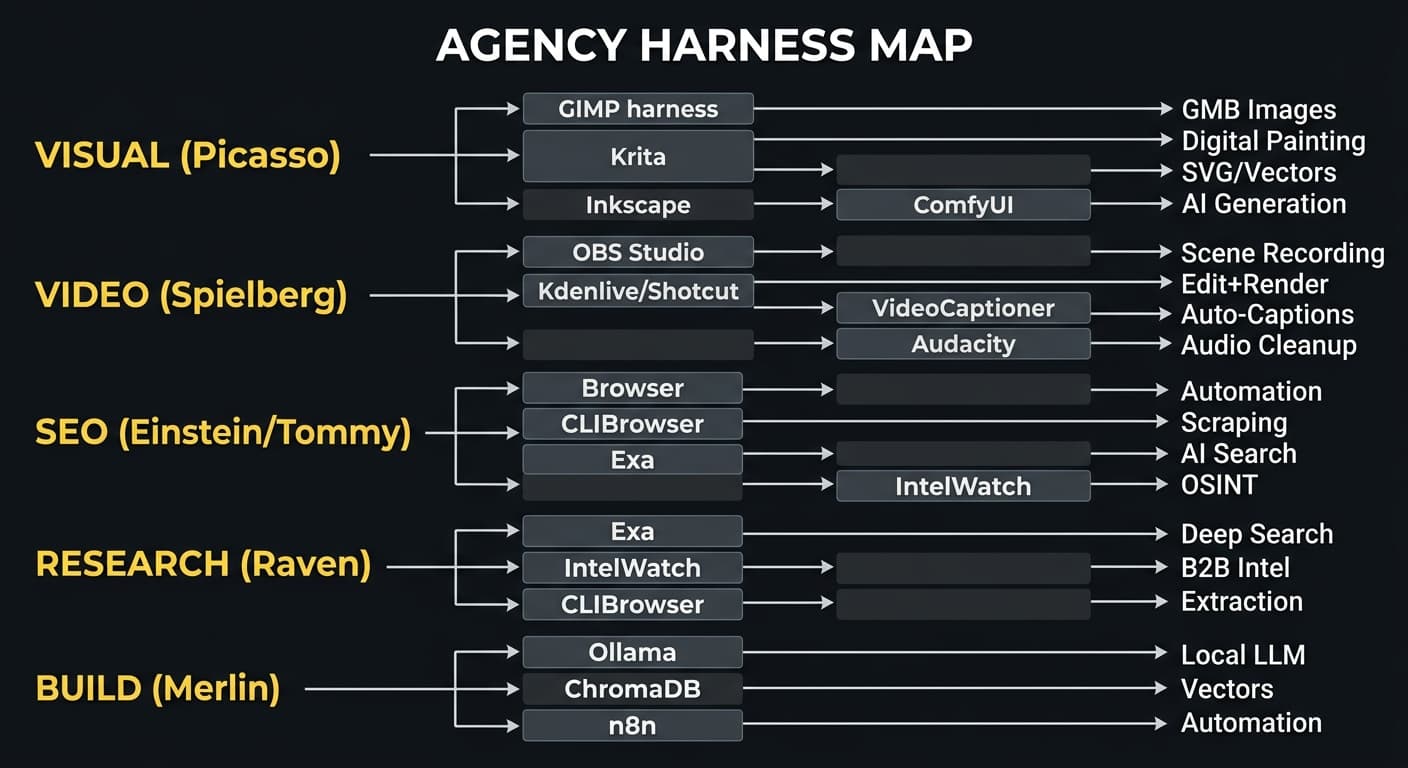
Agent self-discovery: Prompt any agent:
The agent browses the catalog, installs the right harness, reads its SKILL.md, and executes — zero human intervention.
"Find appropriate CLI software in CLI-Hub and complete the task: [your task]"The agent browses the catalog, installs the right harness, reads its SKILL.md, and executes — zero human intervention.